



In a saturated digital market, products are rarely unique, but experiences are. If your interface introduces friction, competitors are only a click away. User Experience (UX) has become the primary differentiator for brand survival.
Historically, UX design has been plagued by resource constraints: tight budgets, limited user research, and the ambiguity of subjective design choices. The integration of Artificial Intelligence (AI) is currently reshaping this landscape, moving the industry from reactive design to predictive precision.
However, most designers fundamentally misunderstand the role of AI. It is not just about generating assets faster; it is about validating decisions with scientific accuracy before code is ever written.
Key Insights
- The Shift: AI is moving UX from "Generative" (creating assets) to "Predictive" (validating decisions before code).
- The Metric: Predictive eye-tracking measures Visual Salience with 90%+ accuracy, eliminating the need for expensive early-stage user testing.
- The Evidence: In our comparative case study, Nike’s predictive hierarchy captured 11.2% more attention on key conversion elements than Adidas.
- The Strategy: Use AI to automate data gathering (Google Analytics) and visual validation (expoze.io), freeing human designers to focus on empathy and architecture.
What is AI-Driven UX?
AI-Driven UX refers to the application of machine learning algorithms to automate, analyze, and predict user interactions within digital interfaces. Unlike traditional design, which relies on post-launch analytics, AI-Driven UX utilizes predictive modeling—such as cognitive attention simulation—to identify usability friction and visual hierarchy issues during the prototyping phase.
Below, we analyze the seven specific vectors where AI is upgrading the UX workflow, moving from data gathering to predictive validation.
1. Analyzing User Data for Adaptive Interfaces
Traditional user research is often the first casualty of a tight budget. AI solves this by processing vast datasets to reveal behavioral patterns that human analysts simply cannot scale to find.
The Baseline: Predictive Content (The Explore Page)
Most designers know that Instagram uses AI to personalize content. The "Explore" page is unique for every user because algorithms analyze watch time and interaction history to predict what you want to see next. But recently, this data has started influencing the interface itself.
The Evolution: Adaptive UI (The Navigation Bar)
While Instagram has historically cycled through various static navigation tests, they have now moved beyond simple A/B testing. Today, they utilize behavioral segmentation to dynamically modify the app's structure.
For years, this meant swapping the Reels and Create (+) buttons based on whether you were a "Watcher" or a "Poster." But in 2025, a new pattern emerged:
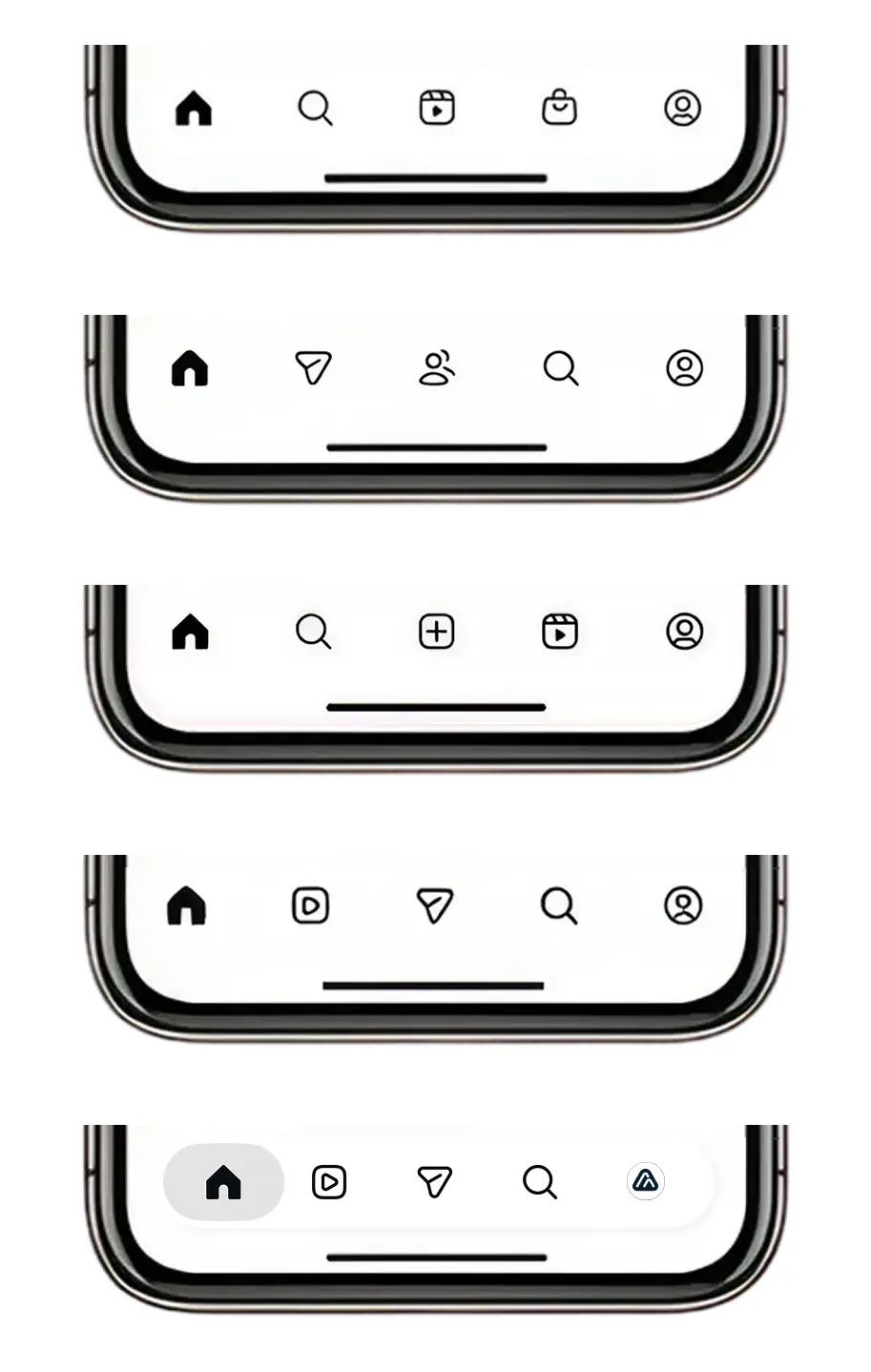
This represents a major shift: We are moving from static layouts to living interfaces that physically restructure themselves to reduce friction based on predicted intent.
Applying the Logic
You don't need Meta’s proprietary tech to adopt this mindset. Similar predictive modeling is becoming standard in most analytics stacks (like GA4), allowing you to detect these behavioral anomalies automatically. By leveraging these automated segments, you can move from "guessing" user intent to designing for statistically probable behaviors.
2. Algorithmic Persona Generation
Creating user personas often feels like creative writing rather than data science. AI tools allow us to synthesize qualitative data into rigorous user archetypes.
Tools like Smartone perform sentiment analysis on social conversations to build personas based on real emotional triggers, while ChatGPT can synthesize demographic data into preliminary empathy maps. This ensures your design targets a verified audience segment, not a fictional character.
3. Automating the "Generative" Phase
The most visible application of AI in UX is Generative Design. This creates the raw material of the interface.
- Midjourney & DALL-E 2: These tools rapidly prototype visual concepts, allowing designers to A/B test aesthetic directions (e.g., "Minimalist" vs. "Brutalist") in minutes rather than days.
- Brainpool: Automates workflow bottlenecks, generating code specifications from visual prototypes.
This automation reduces the Cognitive Load (Link to Glossary) on designers, freeing them to focus on information architecture rather than pixel-pushing.
4. Pretesting with Predictive Attention (The Game Changer)
This is the most critical advancement in modern UX. While Generative AI creates options, Predictive AI tells you which option works.
Traditional testing (recruiting users, recording sessions) is slow and expensive. Predictive eye-tracking uses AI models trained on human vision data to simulate how a user will view a design with 90%+ accuracy.
The Case Study: Nike vs. Adidas
We applied expoze.io to analyze the e-commerce category pages of two retail giants to measure Visual Salience.
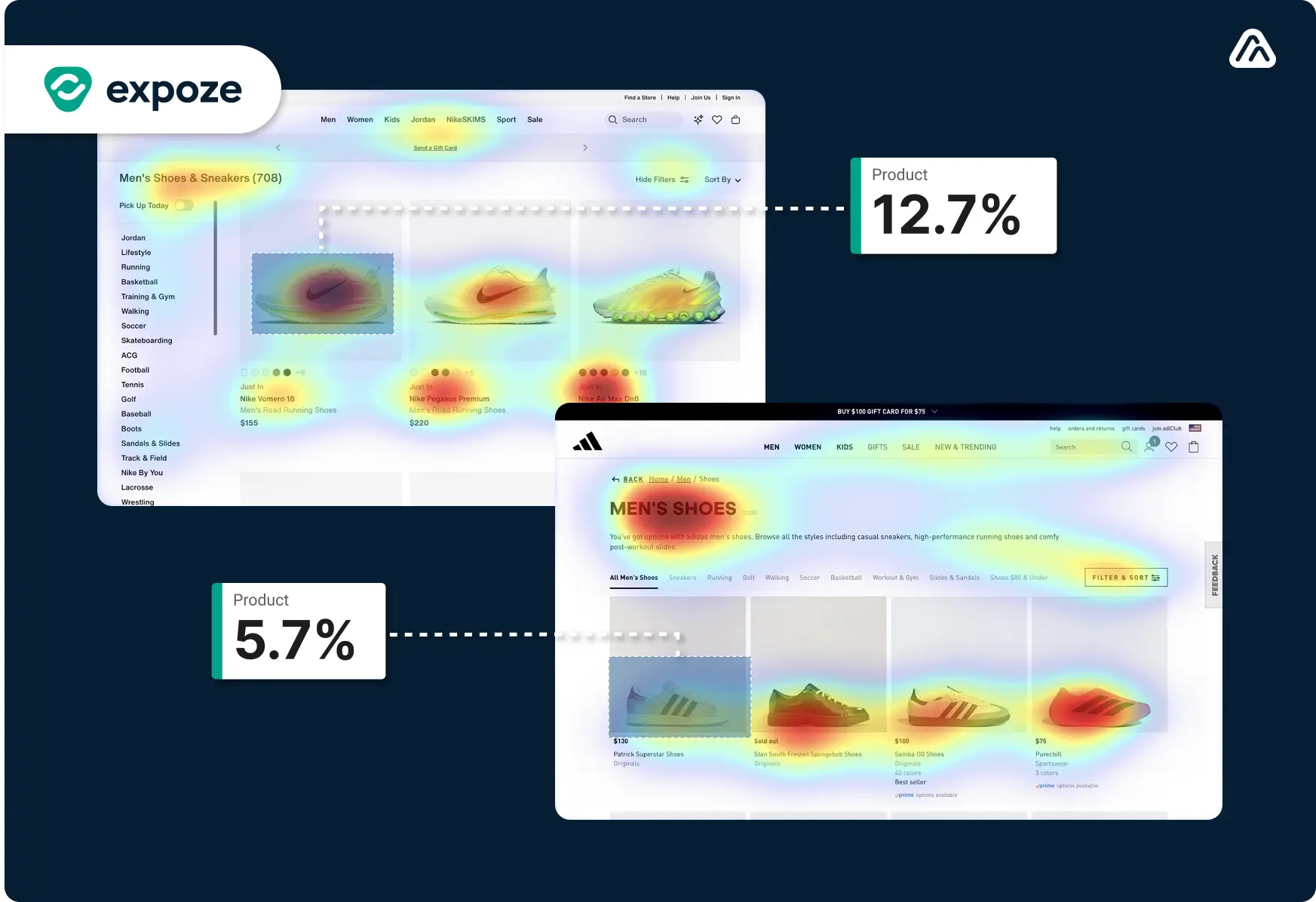
The heatmap above highlights a critical difference in design strategy. Nike utilizes a spacious layout with a clear hierarchy, driving 12.7% of user focus directly to the primary product. In contrast, Adidas uses a denser grid that fragments attention, resulting in only 5.7% focus on the equivalent placement.
The Implication: By simply reducing visual clutter, Nike achieved more than double the visual engagement on their key conversion trigger. Using predictive testing allowed us to diagnose this "High Visual Complexity" issue instantly, without running a single live user session.
5. Context-Aware UX Writing
Lorem Ipsum is a relic of the past. Content is a design element, and AI ensures it is optimized for conversion.
Tools like Writer and Copy.ai ensure tone consistency across the product, while ChatGPT can generate context-specific microcopy for error states and onboarding flows. This ensures the voice of the product supports the visual hierarchy.
6. Eliminating "Blank Canvas" Ambiguity
The "Cold Start" problem plagues many design sprints. AI tools like Designify and Framer X utilize component libraries that adapt to user inputs, providing a structural foundation for interactive projects. This reduces the ambiguity of early-stage prototyping.
7. Automated Visual Harmony
Finally, AI assists in the subtle art of UI polish. Tools like Adobe Sensei and Khroma analyze branding guidelines to recommend accessible color palettes and font pairings that maintain visual consistency. This is crucial for maintaining low Visual Complexity (Link to YouTube Ads/Visual Complexity Blog), ensuring the interface remains scannable and accessible.
The Limitations of AI in UX
While the data confirms AI's utility, it is not a replacement for human intuition.
- Contextual Blindness: AI models struggle with cultural nuances and deep empathy.
- Data Bias: Algorithms trained on historical data may perpetuate exclusion if not monitored.
- The "Average" Trap: Over-reliance on generative tools can lead to homogenized, "safe" designs that lack brand distinctiveness.
Conclusion: The Era of Evidence-Based Design
The future of UX is not just about making things look good; it is about proving they work.
By combining Generative AI (to create) with Predictive AI (to validate), designers can finally bridge the gap between creativity and conversion. The data from our Nike vs. Adidas comparison proves that subtle changes in layout drive massive differences in attention.
Don't leave your user experience to chance.
Start validating your designs with predictive eye-tracking today.
Upload your design to expoze for a free heatmap analysis

.png)


